Ad Blocker For FirefoxIs Adblock Plus Safe? Permissions, Data, Acceptable Ads and the Concerns Explained
Is Adblock Plus Safe? Permissions, Data, Acceptable Ads and the Concerns Explained
The short answer
Adblock Plus is a legitimate, widely used extension, and it is generally considered safe when installed from the official source. The main concerns are not about malware in the genuine product. They are about the acceptable ads program, which is on by default and lets some advertisers through, and about copycat versions that may carry adware. You can turn off acceptable ads in its settings and install only from the official site or store.
Some links on this site are affiliate links: if you buy through one, the site may earn a commission at no extra cost to you. More about this.
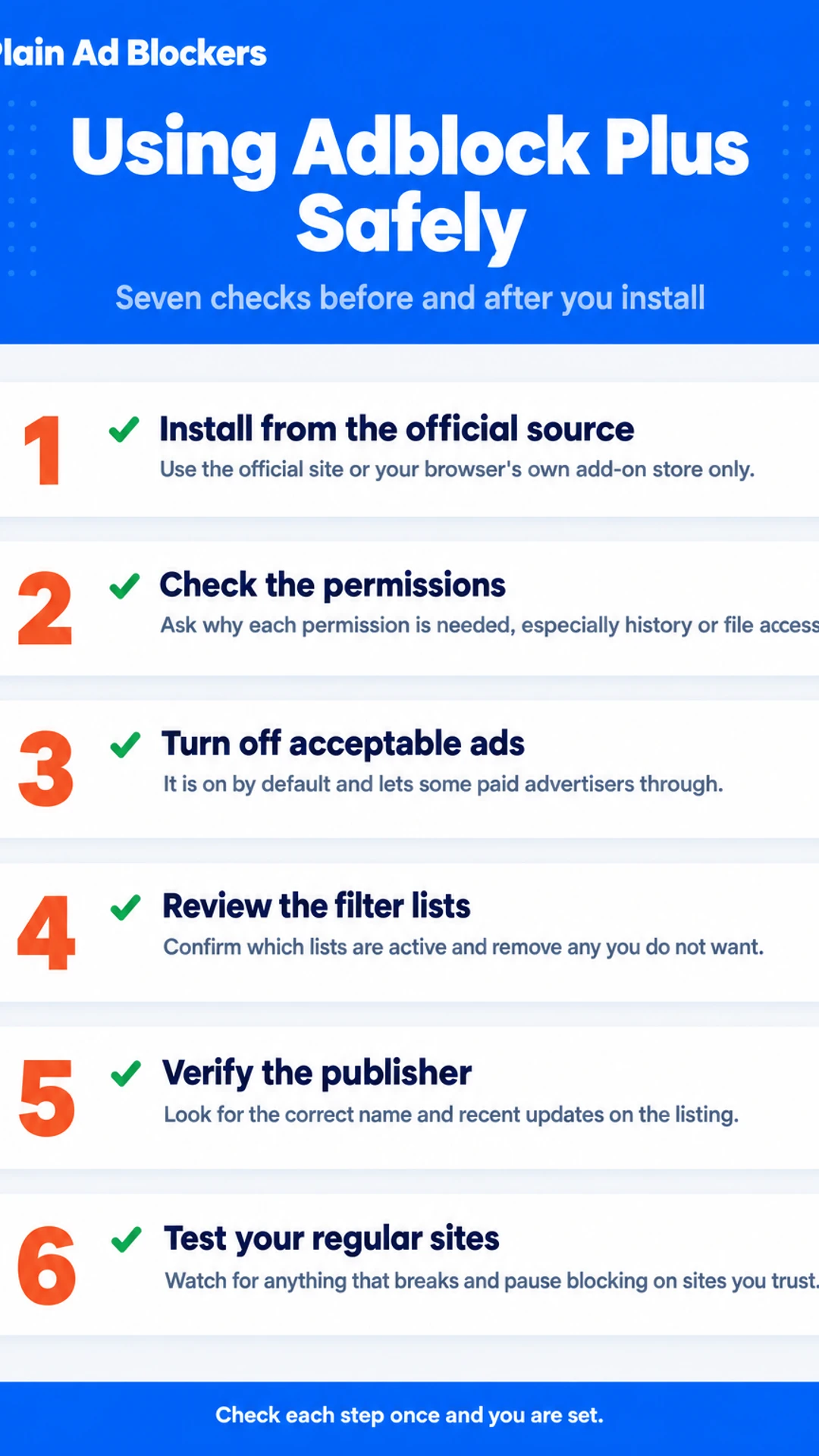
Here is the short version of what to do:
- Install only from the official Adblock Plus site or your browser's official add-on store.
- Check the extension's listed permissions before you click install.
- Open the settings and turn off the acceptable ads option.
- Review the list of filters it is using.
- Check the extension page for the publisher name and recent updates.
- Test a few sites you visit often, and watch for anything that breaks.
- Know how to pause it on a site you trust.
If you are trying to get rid of pop-ups, autoplay video and the constant clutter of modern pages, you are not alone. Ads slow pages down, eat into mobile data and track what you read. Many people want a cleaner experience, and they want to know whether the blocker they pick will work in Firefox, Chrome or on Android, not just on the browser they used last year.
That is a fair thing to worry about. A blocker is software that sits between you and every site you visit, so it is reasonable to ask what it can see and whether it might be quietly collecting data or pushing its own content. Those questions deserve straight answers, not marketing.
This article gives you those answers. It covers what Adblock Plus asks for when you install it, how its data handling works, what acceptable ads actually means for you, and where the real risks sit. It also explains how to set it up more safely, so you can decide with confidence. Plain Ad Blockers has put it together for everyday browser users, with no jargon and no sales pitch.
Adblock Plus at a glance
| Aspect | What the article says |
|---|---|
| Genuine product | Not malware, long-running |
| Acceptable ads | On by default, can be turned off |
| Main risk | Copycat versions with adware |
| Permissions | Broad access, needs a reason |
| Performance | Higher CPU and memory in one test |
Is Adblock Plus Safe to Install?
Yes, the genuine Adblock Plus is not malware. It is a long-running extension that has been around for many years, and the version you get from the official source is a legitimate tool for blocking ads.
The real danger is with copies. Because the name is well known, fake versions and copycat extensions appear in stores and search results. Some of these collect data, inject unwanted content or push other software. If you install a lookalike, the problem is not Adblock Plus itself but whatever you actually installed.
The second thing to check is the acceptable ads setting. By default, Adblock Plus lets some advertisers through through an acceptable ads program, where companies can pay to bypass block lists. This is not hidden, but many people do not expect it. If you want blocking without exceptions, you need to turn it off in the settings.
To keep the risk low:
- Install only from the official Adblock Plus site or the browser's own add-on store, and check the publisher name.
- Be wary of a listing with a slightly different name, odd reviews or a sudden burst of installs.
- Open the settings after install and decide how you want acceptable ads handled.
- Confirm that the icon and settings page look like the official ones before you trust it.
Installing from the official source removes most of the danger. From there, the choice is about how much blocking you want, and whether you are happy with the default exceptions. Plain Ad Blockers has not tested Adblock Plus beyond checking these published points.
What Permissions Adblock Plus Asks For
When you install an extension, the browser shows a list of what it can do. These are its permissions. They describe what the extension can read or change on the pages you visit.
An ad blocker needs broad access. To hide an ad, it has to read the page and change what appears on it. So a long permission list is not automatically a warning sign. For a blocker, reading and changing page content is the job.
What you should check is whether each permission has a reason. Look for permissions that seem unrelated to blocking, such as:
- Access to your browsing history beyond the sites you are on
- Access to your bookmarks or downloads
- Access to files on your computer
- The ability to change your default search engine or homepage
If you see one of these, ask why the extension needs it. A blocker that only hides ads has no obvious use for it. If the answer is not clear from the extension's own description or support pages, that is a reason to pause.
Also keep in mind that Adblock Plus has its own settings for acceptable ads and filter lists. Those settings control what gets blocked, not what the extension can access. Check them after install, not just the permission prompt.
Data Collection and Privacy
When you ask whether Adblock Plus is safe, the first place to look is its published privacy policy on the official site. Read it yourself. It sets out what the extension collects, and it gives reasons for each item. You don't need a technical background to follow it, and it is the most reliable source for what the company says it does.
Most of what matters comes down to one split: what the blocker handles on your own device, and what it sends out.
- Handled locally: The filter lists that decide what gets blocked are checked against each page on your computer or phone. The page you are reading is not sent to a server to be judged.
- Sent out: Anything the policy says is transmitted, such as basic settings, update requests or data tied to the acceptable ads program, should be listed with its purpose.
I read the policy before I would recommend any extension to a friend. The main thing I look for is whether the reasons given are specific. A vague line about "improving the service" tells you less than a clear list of what is sent and why.
Anything beyond what the published policy states, including claims about how data is used by third parties or how the company earns money, is something I have not verified. Treat those statements as unconfirmed until you can check them yourself.
The Acceptable Ads Program
Adblock Plus comes with a feature called Acceptable Ads turned on by default. It lets certain companies pay to have their ads shown, even when they would otherwise be blocked. The companies on that list are usually larger advertisers, and the rules for who gets in are set by the program's maintainers.
If you want full blocking, you can turn this off. Here is how:
- Click the Adblock Plus icon in your browser toolbar.
- Open the extension settings from the menu.
- Find the Acceptable Ads option.
- Switch it off and refresh the page you are on.
Some readers are fine with this trade-off. They like that the ads are supposed to be less intrusive, and they would rather see a few approved ads than have sites break. Others do not want any ads through at all, and they turn the option off straight away. Both choices are reasonable. It depends on how you want your web pages to look and what you are willing to accept.
In my own use, I prefer the setting off, because I want a clean page with nothing paid for on it. That is a personal preference, not a rule you have to follow.
Malware, Fake Versions and Performance
Adblock Plus is a well-known name, and that is exactly why copies of it turn up. Some extensions use similar names, icons and descriptions to trick you into installing them. Before you click install, check the publisher name on the listing. The developers of other blockers have warned about lookalike extensions, so it is worth a quick look every time.
Watch for these signs of a fake or suspicious copy:
- The publisher name is unfamiliar, or does not match the one you expect
- The listing has very few users or no clear history
- The name is slightly off, with extra words or a misspelling
- It asks for far more access to your browsing than a blocker needs
If you are unsure about an extension you already have, remove it. Then reinstall from the official store or the official site for your browser. This takes a few minutes and is the simplest way to be sure.
Performance is a separate concern. In CoolTechZone's video, the reviewer found that Adblock Plus used more CPU and memory than other blockers while many tabs were open. They removed it after about half an hour because of the slowdown. If you keep lots of tabs open, it is worth noticing whether your browser feels sluggish after you install it. Plain Ad Blockers publishes this extension, and that is all this page can say about it.
Adblock Plus Compared With Other Blockers, and Who Should Use It
Adblock Plus is one of the best-known ad blockers, but it is not the only choice. The right pick depends on what you care about most.
Plain Ad Blockers did not test these tools itself. The comparison below draws on a hands-on review by CoolTechZone, "I found the best AD BLOCKER extension | 3 Tools Compared." In that review, the reviewer named Surfshark CleanWeb the best all-round option across devices, and Total AdBlock the best simple browser-only option. The reviewer advised avoiding Adblock Plus by default, mainly because of its acceptable ads program and higher resource use.
Which blocker fits which need?
- Total AdBlock is a simple choice if you only want to block ads and trackers in your browser. The reviewer said it worked straight away after install and a tab refresh, and it dealt with YouTube pre-roll ads and cookie banners.
- Surfshark CleanWeb covers the whole device, including apps and some TV setups. It works through the VPN app, so blocking only applies while the VPN is on.
- uBlock Origin is another option many readers compare. Our separate guide covers its setup.
- Adblock Plus suits you if you want a familiar, established tool and you are comfortable checking the acceptable ads setting. Turn that setting off if you want full blocking.
Should you use Adblock Plus?
Choose Adblock Plus if you want a tool you already know and you will manage its settings. Choose another option if speed, low memory use or full blocking matters most to you.
Which blocker fits which need
| Blocker | Best for | Key point |
|---|---|---|
| Total AdBlock | Simple browser-only blocking | Works after install and refresh |
| Surfshark CleanWeb | Whole device coverage | Only works while VPN is on |
| uBlock Origin | Readers comparing options | Covered in a separate guide |
| Adblock Plus | Familiar, established tool | Check acceptable ads setting |
What hands-on reviewers found
These are other people's hands-on tests, summarised and credited to them. Watch the full videos for their complete reviews.
CoolTechZone: I found the best AD BLOCKER extension | 3 Tools Compared
The reviewer thinks Surfshark's CleanWeb is the best all-round ad blocker across devices, Total AdBlock is the best simple browser-only option, and Adblock Plus should be avoided by default because of its acceptable ads program and higher r
- Adblock Plus enables an acceptable ads program by default, letting companies like Google or Amazon pay to bypass block lists. The reviewer had to disable this in settings. (at 1:04)
- Adblock Plus uses more CPU and memory than other ad blockers. The reviewer, who keeps many tabs open, felt the drag and removed it after about half an hour. (at 1:20)
- Total AdBlock worked straight away after install and a tab refresh. Display ads, pop-ups, cookie banners and YouTube pre-rolls were all gone. (at 1:38)
Frequently asked questions
Is AdBlock Pro safe?
AdBlock Pro is a paid product from the same family of tools, and it is generally considered safe when you install it from the official browser store or the publisher's own site. Safety depends on the permissions it asks for and how it handles your data, so read its privacy policy before you install. Avoid copies from unknown sites, since those are where malicious versions usually turn up.
What is the safest ad blocker for Chrome?
The safest choice is usually an ad blocker with a clear privacy policy, a publisher you can identify, and a small list of permissions that match what it does. Look for open-source tools that have been reviewed publicly, and check the permissions list before you add anything. Install only from the Chrome Web Store, and remove any extension you no longer use.
Is AdBlock Plus illegal?
No. Adblock Plus is a legal browser extension that people install in Chrome, Firefox and other browsers. Blocking ads on your own device is a choice you are allowed to make. The concerns people raise are about its acceptable ads program and how it handles data, not about whether it is legal to use.
Is AdBlock Ninja safe to use?
Lesser-known ad blockers like AdBlock Ninja deserve more caution than established names. Check who publishes it, read its privacy policy, and look at the permissions it requests. If it asks to read all your data on every site without a clear reason, or if reviews mention unwanted changes to pages, uninstall it and choose a better-documented option.
Is Adblock Plus safe to install?
Adblock Plus is widely installed and has a long public history, so it is not a malicious product. The points to weigh are its published permissions, its data policy and its acceptable ads setting, which lets some advertisers through by default. Many people are comfortable with it once they understand those trade-offs and change the settings they do not want.
Wrapping up
Adblock Plus is a legitimate, long-established extension, so it is not unsafe in the way a fake or malicious blocker is. The real questions are what it is allowed to see, how its data policy works, and whether you want its acceptable ads program turned on. Read the permissions and privacy policy before you install, and check the acceptable ads setting once you do. Do you use Adblock Plus, or have you switched to something else? Tell us in the comments what made you choose.