Ad Blocker For FirefoxFree Ad Blockers for Android: What Works in Mobile Browsers
Free Ad Blockers for Android: What Works in Mobile Browsers
The short answer
The best free ad blocker for Android depends on how far you want blocking to reach. A browser-only extension or app is simplest for everyday web pages. System-wide options such as AdGuard, Blokada or AdAway block ads in other apps too. Many are free, but some use upgrade prompts or limit features in the free version, so check the free tier before you install.
Some links on this site are affiliate links: if you buy through one, the site may earn a commission at no extra cost to you. More about this.
- Browser-only versus system-wide: what each type covers on your phone
- Which free options are worth a look: and what to watch for in each
- Hidden costs: upgrade prompts, locked features and acceptable ads settings
- Safety and permissions: how to judge whether a blocker is trustworthy
- Breakage and turning blocking off: fixing a site or video player that misbehaves
- Firefox for Android: which extensions work on mobile, and how that differs from Chrome
If you have ever tapped a page only to have it jump under a video ad, you know how frustrating mobile browsing can get. Pop-ups, autoplay clips and cookie banners take up the screen, slow the page down and quietly use up data on a mobile connection. You want the page you came for, and you want it without the noise.
That is a reasonable thing to want, and it is achievable. Picking the right free blocker comes down to matching the tool to what you actually use your phone for, not chasing the longest feature list. Below, we go through the options, what each one blocks, and where the catches are, so you can choose with your eyes open.
We also explain how the picks were chosen, so you can see the reasoning rather than take it on trust. Work through the list in order, or jump to the section that matches your browser and your problem.
Free Android ad blockers at a glance
| Blocker | Where it blocks | Root needed |
|---|---|---|
| Adblock Browser | Its own browser only | Not stated |
| AdAway | System-wide | Yes, for the usual method |
| AdGuard | Own browser and across apps | Not stated |
| Blokada | Apps and browsers | No |
| AdBlock | Browser-based | Not stated |
Which Free Ad Blockers Work on Android
Android gives you two main ways to block ads: a browser with a built-in blocker, or an app that filters ads across the whole device. Here are the free options that come up most often, and what each one is.
- Adblock Browser: a standalone Android browser with ad blocking built in. You switch to it instead of Chrome.
- AdAway: an open-source app that blocks ads system-wide. It needs a rooted device, so it is not a casual install for most people.
- AdGuard: a blocker that works in its own browser or across apps. It has a free tier, and some features sit behind a paid plan.
- Blokada: a system-wide blocker that works without root. It filters ads in apps and browsers alike.
- AdBlock: a browser-based blocker. Its page shows which features are free and which need a paid plan.
Free and paid features are listed on the AdBlock and Adblock Plus pages, so check those before you install. Expect upgrade prompts from most free tools.
We have not tested every option on this list. How we chose them: they are widely known free blockers for Android, and some of the claims below come from other reviewers, not from us. Where a point comes from someone else, we say so.
For example, in CoolTechZone's review of ad blockers, the reviewer found that Adblock Plus turns on an acceptable ads program by default, and had to switch it off in settings. The same reviewer said Total AdBlock worked straight away after install.
Browser-Only Blocking Versus Whole-Device Blocking
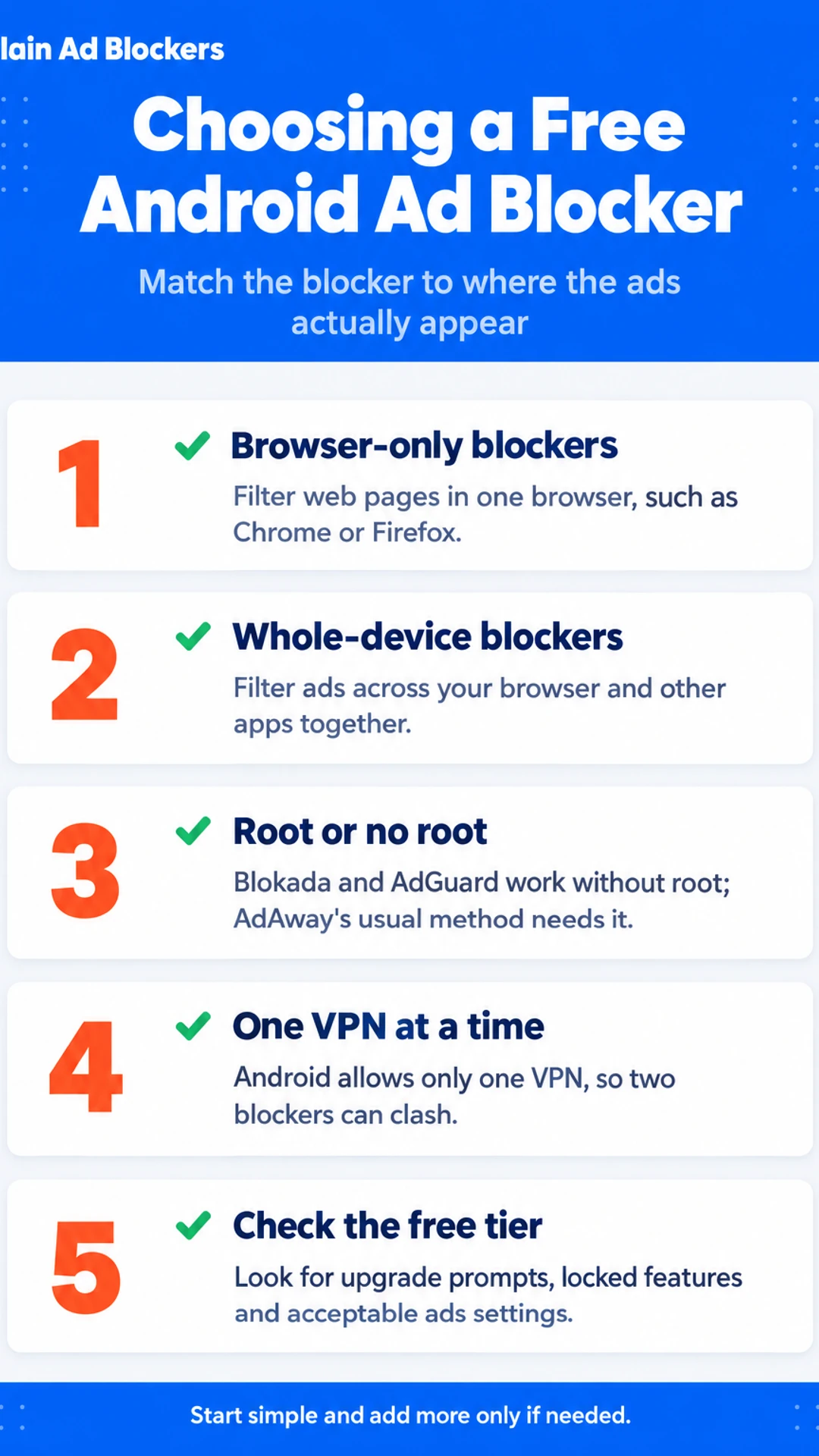
Most free ad blockers for Android are browser blockers. They run inside one app, usually Chrome or Firefox, and they filter what that browser loads. That covers a lot of everyday browsing, but it stops there.
If you use apps, the ads in those apps will still show. A free game with banners at the bottom, a news app with interstitial video, or a shopping app that pushes pop-ups will not be touched by a browser extension.
What does a whole-device blocker actually do?
A system-wide blocker works at the network level. Instead of checking pages one by one, it filters the requests your device makes to ad and tracking servers. That means it can cover your browser and your apps at the same time.
The trade-off is setup. Most of these tools run through a VPN or a DNS setting, so you usually need to keep that service switched on. Read how it works before you commit.
Which option fits your situation?
- If you mainly browse the web, a browser blocker is usually enough.
- If ads in apps and games bother you, you need a whole-device option.
- If you want the simplest setup, start with a browser blocker.
In the CoolTechZone review, Total AdBlock was described as the best simple browser-only option. The same reviewer called Surfshark CleanWeb the best all-round choice, because it covers apps and some TV setups through the VPN app. They also noted that CleanWeb only blocks properly when the VPN is active with CleanWeb switched on.
I would start with a browser blocker and only add a whole-device tool if app ads are the real problem.
Root, No-Root and VPN-Based Options
Most people do not need root access to block ads on Android. Modern free options such as Blokada 5 and AdGuard work without root, and you install them like any other app. If you only want ads gone from your phone and do not want to change system settings, start there.
AdAway is different. It can block ads in two ways. One uses a hosts file, which is a list of web addresses your phone should not load. The other uses VPN-based filtering. The hosts method is listed as needing no root, but the catch is that a normal hosts change on Android usually does need root. Read the setup steps carefully and make sure you understand the trade-off before you go ahead.
VPN-based blockers work by sending your phone's traffic through a local VPN service on the device. That service checks each request and drops the ones linked to ads and trackers. It is convenient, but it has one real limit: Android allows only one VPN at a time. If you already use a VPN for privacy or to reach a service, the two will clash.
Running two blockers or two VPNs together is the most common reason sites and apps stop working. If something breaks after you install a second tool, turn off one of them and test again. Keep one blocker active at a time, and you will avoid most of the trouble.
CoolTechZone review findings
| Tool | Reported strength | Reported drawback |
|---|---|---|
| Adblock Plus | Named in the review as a blocker | Acceptable ads on by default, higher CPU and memory use |
| Total AdBlock | Worked straight away after install | Browser-only protection |
| Surfshark CleanWeb | Covers apps and some TV setups | Works only with the VPN active |
What Is Really Free and Where the Costs Hide
Many ad blockers say they are free, but the free part is not always the whole product. Before you rely on an app, check what you actually get without paying.
Look for a few common patterns:
- Locked features that only show up in the paid tier
- Time-limited trials that turn into a subscription prompt
- Upgrade prompts that appear often or interrupt you
The Android app and the content blocker version of AdGuard are not the same thing. AdGuard's own FAQ and page content explain the difference, so read those before you install. Do not assume the free version has everything the paid one does. Read the current terms, since they change.
Adblock Plus is a separate case. It turns on an acceptable ads program by default, which lets some companies pay to get past its block lists. In CoolTechZone's test, the reviewer had to switch this off in settings. CoolTechZone also found Adblock Plus used more CPU and memory than other blockers. The reviewer, who keeps many tabs open, removed it after about half an hour. Settings like these are easy to miss, so check them yourself.
Some tools that look free are really paid models. Surfshark covers unlimited devices under one subscription. That is a good deal for some people, but it is a paid service, not a free ad blocker.
YouTube Ads, Speed, Data and Battery
Video ads are the complaint people raise most often. A pre-roll that plays before a clip, or a mid-roll that cuts into the middle of a video, breaks the flow of what you are watching. A good free ad blocker for android should stop these, but not every blocker handles them the same way.
Here is the catch. A browser blocker often works on YouTube in the mobile browser, but the YouTube app is a separate program. A blocker that runs in Chrome or Firefox may do nothing inside the app. Check which one you actually watch in before you pick.
Blocking ads can also cut the work your phone does when a page loads, and it can reduce the data you use on a mobile connection. How much you save depends on the page. A news site full of video and scripts will gain far more than a plain text article. Battery gains follow the same pattern: less work means less drain, but the difference is usually modest.
In CoolTechZone's test of Total AdBlock, the blocker removed display ads, pop-ups, cookie banners and YouTube pre-rolls straight after install and a tab refresh. That is a useful result for a browser-only tool, though it is one reviewer's test, not something I have checked myself.
Before you install anything, check a few things:
- Which browser you use, since some Chrome extensions are not available in Chrome for Android
- Whether you watch YouTube in the browser or the app
- Whether the blocker is truly free or pushes you toward a paid plan
- How you will switch it off for a site you trust
Safety, Turning Blocking Off for a Site, and Common Questions
Is a free ad blocker for Android safe to use?
Check two things before you install. First, who makes the app. A known developer with a clear privacy policy is a better bet than an unknown name with a long list of downloads from nowhere. Second, what permissions it asks for. An ad blocker has no real need for your contacts, location or microphone. If it asks for them, skip it. For a closer look at one popular option, see our separate page on whether Adblock Plus is safe.
How do I turn blocking off for a site I trust?
Most blockers let you allowlist a site. Open the app's settings, find the allowlist or "disable on this site" option, and add the address. In a browser, you can often do the same through the site's settings or the shield icon in the address bar. Once the site is allowed, reload the page.
What do I do if a site breaks?
Work through these steps in order:
- Allow the site in your blocker and reload the page.
- If it still breaks, clear the site's cache and cookies, then reload.
- Check whether a second blocker or a VPN with ad blocking is running. Two blockers can clash.
- Turn off the blocker briefly to confirm it is the cause.
How do I get rid of Android ads for free?
Install a free, reputable ad blocker for your browser or a system-level blocker that does not need root, then keep its filter lists updated.
What is the most reliable free blocker?
Reliability depends on what you use. In a hands-on review, CoolTechZone found Total AdBlock worked straight away and was simple to set up, though it only protects the browser. Their review and the rest of this guide should help you match a blocker to your setup.
Is AdGuard completely free?
Its core blocking is available free, but some extras and advanced features sit behind a paid tier. Check the current terms before you install, since these can change.
What is the best free blocking app?
There is no single winner for everyone. For browser-only blocking on Android, start with a well-reviewed free option and test it on the sites you visit most.
For the full browser and device comparison, see our hub page on ad blockers for Firefox. If you use Firefox on your phone, the Firefox for Android page covers which extensions work there.
What hands-on reviewers found
These are other people's hands-on tests, summarised and credited to them. Watch the full videos for their complete reviews.
CoolTechZone: I found the best AD BLOCKER extension | 3 Tools Compared
The reviewer thinks Surfshark's CleanWeb is the best all-round ad blocker across devices, Total AdBlock is the best simple browser-only option, and Adblock Plus should be avoided by default because of its acceptable ads program and higher r
- Adblock Plus enables an acceptable ads program by default, letting companies like Google or Amazon pay to bypass block lists. The reviewer had to disable this in settings. (at 1:04)
- Adblock Plus uses more CPU and memory than other ad blockers. The reviewer, who keeps many tabs open, felt the drag and removed it after about half an hour. (at 1:20)
- Total AdBlock worked straight away after install and a tab refresh. Display ads, pop-ups, cookie banners and YouTube pre-rolls were all gone. (at 1:38)
Frequently asked questions
How do I get rid of ads on my Android for free?
The most direct free option is a browser with built-in or extension-based ad blocking, such as Firefox for Android with a blocker extension installed. Many ad-blocking apps also run as a local filter across the whole device, though these vary in how much they block. Check the settings after install, since some apps turn on acceptable-ads programs by default.
What is the most reliable free ad blocker?
Reliability depends on whether you want protection in one browser or across your whole phone. Browser-based blockers are simpler and tend to work well for web pages. Whichever you pick, test it on a few sites you use daily, and make sure it still lets your trusted sites and video players load normally.
Is AdGuard completely free?
AdGuard offers a free version, but some features and filters are limited, and the app may show prompts to upgrade. Before installing, read what the free version includes and whether any functions require a paid plan. Its free status is worth confirming on the official site, since offers and versions change over time.
What is the best free app for blocking ads?
There is no single best app for everyone. A browser extension is usually the easiest choice if you only browse the web, while a system-level app can cover apps and games too. Pick one that is free as you use it, does not push an upgrade on every launch, and is clear about what data it collects.
Will a free ad blocker slow down my phone?
Some blockers use more memory and battery than others, especially if they run constant background filtering. Lighter browser-based blockers generally have less impact. If your phone slows down, try disabling the blocker for a day and compare, then switch to a lighter option if needed.
Wrapping up
Free ad blockers on Android can cut clutter and tracking, but the right choice depends on whether you want protection in one browser or across the whole phone. Check what the free version actually includes, and watch for upgrade prompts and unexpected settings. Which free blocker have you tried on your Android, and how did it work for you? Share your experience in the comments.